How to Send Bulk WhatsApp Messages Without Saving Numbers (2026)
Learn how to send bulk WhatsApp without saving numbers in 2026 — the official, compliant way using the WhatsApp Business API. No mutual saving, no 256 limit.
Key Takeaways
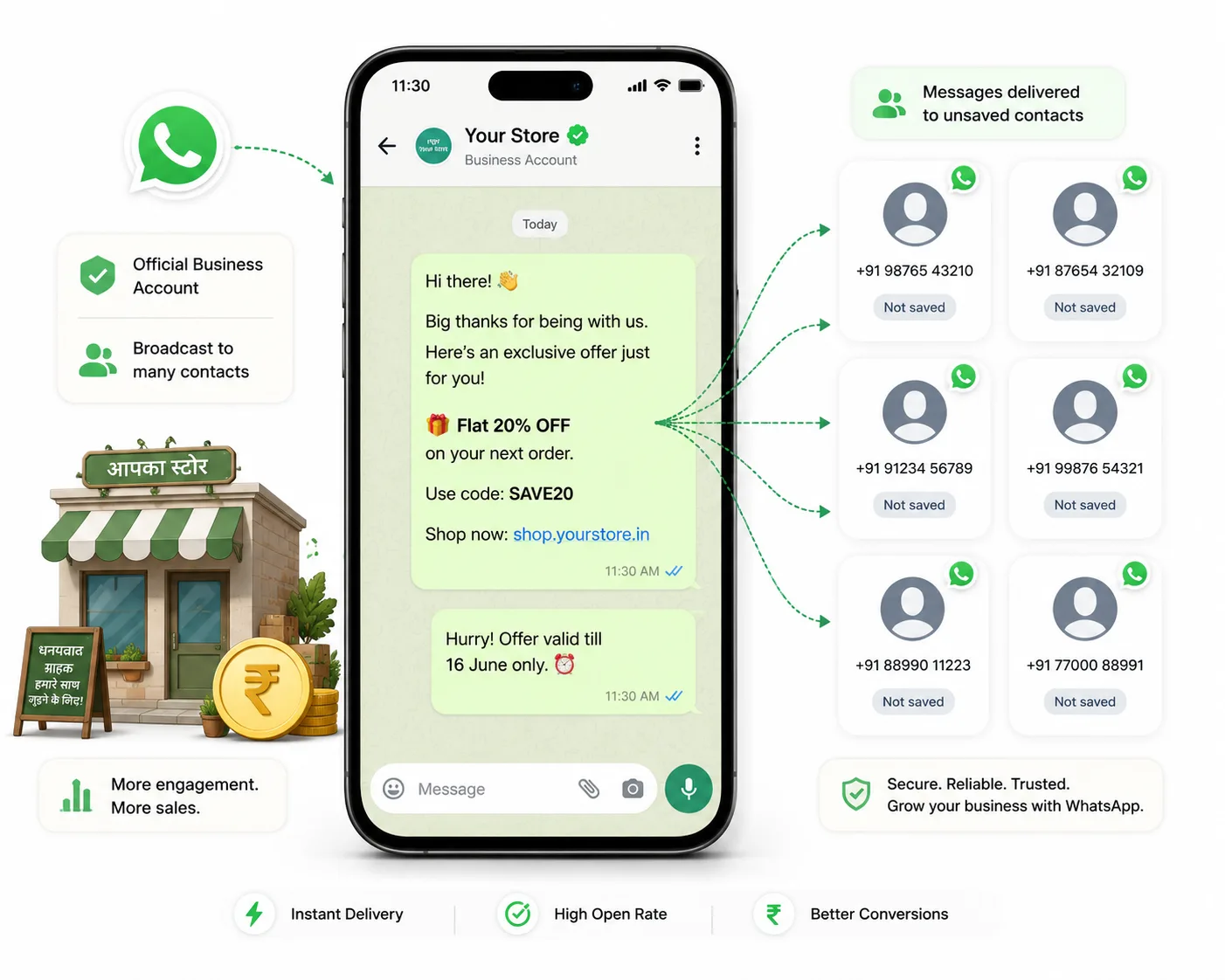
- Yes — you can send bulk WhatsApp without saving numbers using the official WhatsApp Business API. Neither you nor the recipient needs to save the other contact.
- The consumer WhatsApp Business App's broadcast lists do NOT work for this: they cap at 256 recipients and require both parties to save each other.
- Bulk sending on the API is done through pre-approved message templates, and you still need valid opt-in consent from every recipient.
- Avoid grey-market bulk-sender APKs and unofficial tools — they get numbers banned, have no delivery guarantee, and break Indian and Meta compliance rules.
- On PayPerWA the all-in cost is transparent: Meta ₹0.86 + PayPerWA ₹0.20 = ₹1.06 for a marketing message, with no subscription.
Can You Send Bulk WhatsApp Without Saving Numbers?
Yes — you can send bulk WhatsApp messages without saving numbers, but only through the official WhatsApp Business API, and only to people who have opted in. With the API, neither you need to save the recipient's number nor does the recipient need to save yours. You upload a list of phone numbers, pick an approved template, and the message lands in each customer's chat with your verified business name showing at the top.
This is the single biggest difference between the API and every workaround you may have tried. The free WhatsApp Business App forces you into "broadcast lists" that only deliver to people who have saved your number — which is useless for reaching new leads or a freshly collected list. The API removes that barrier entirely, as long as you respect opt-in. This guide explains exactly how it works, what it costs, and how to set it up on PayPerWA in a few minutes.
If you want the wider context on how bulk sending works on the official platform, our guide to sending bulk WhatsApp messages via the API is a good companion read.
Why the WhatsApp Business App Can't Do This
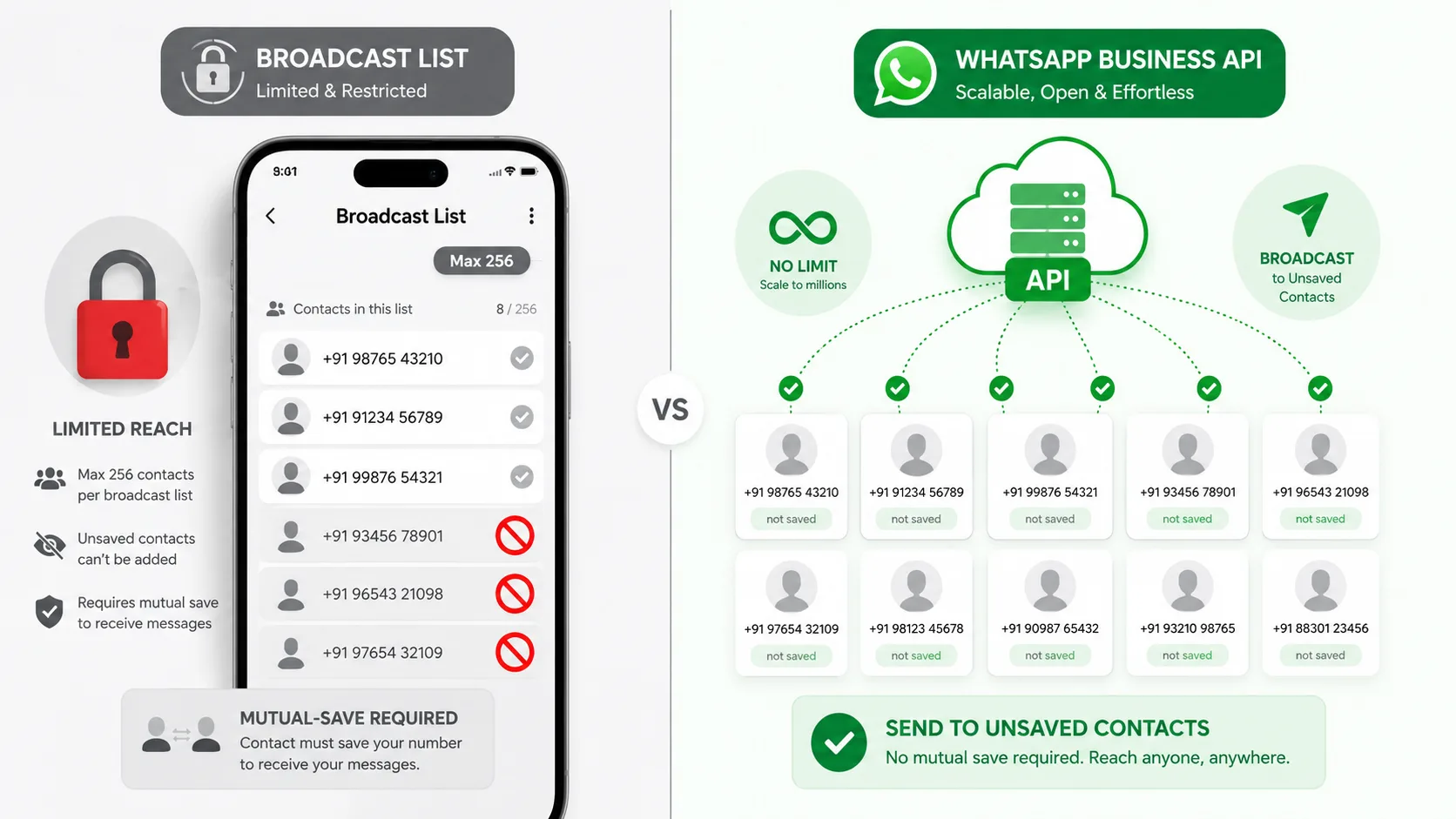
The free WhatsApp Business App cannot send true bulk messages to unsaved numbers because of two hard limits built into the consumer product. First, a broadcast list is capped at 256 recipients. Second — and this is the part most people miss — a broadcast message is only delivered to a contact if that contact has saved your number in their phone. Both parties effectively need to save each other.
That means if you import 5,000 fresh leads from a lead form, an exhibition, or a Razorpay payment list, almost none of them will receive your broadcast, because none of them have saved you. The message silently fails to reach them. You only find out when nobody replies.
- 256-recipient cap per broadcast list — you cannot scale to thousands.
- Mutual saving required — recipients who haven't saved you get nothing.
- No automation, scheduling, or campaign reporting — it is a manual phone app.
- No delivery, read, or failure analytics at scale.
The API solves all four problems at once. For a full side-by-side, read our WhatsApp API vs WhatsApp Business App comparison.
What the WhatsApp Business API Actually Is
The WhatsApp Business API is Meta's official channel that lets businesses send and receive WhatsApp messages programmatically, without the consumer app and without saving contacts. It is the same infrastructure that large brands use, now available to small Indian businesses through platforms like PayPerWA, which connect directly to Meta's Cloud API with no middleman markup.
Three things make the API different from the consumer app:
- No mutual saving. You message opted-in numbers directly; your verified business name shows even if the recipient has never saved you.
- Approved templates for outreach. The first message to a customer (outside the 24-hour service window) must use a template that Meta has pre-approved, which keeps spam down.
- Scale and automation. Send to thousands per campaign, schedule sends, auto-reply, and track delivery and read rates in real time.
Because PayPerWA uses the Meta Cloud API directly, you pay Meta's standard rate plus a flat ₹0.20 platform fee — no per-seat subscription. See the full breakdown on our pricing page and the technical details in our API docs.
Step-by-Step: Send Bulk WhatsApp Without Saving Numbers on PayPerWA
To send bulk WhatsApp without saving numbers, connect your WhatsApp Business number, upload your opted-in contacts, choose an approved template, and send. Here is the exact flow on PayPerWA, which takes most businesses under ten minutes end to end.
- Create your account and connect your number. Sign up at payperwa.com/signup and use Embedded Signup to connect your WhatsApp Business number. This links your number to the Meta Cloud API in about two minutes — no developer needed.
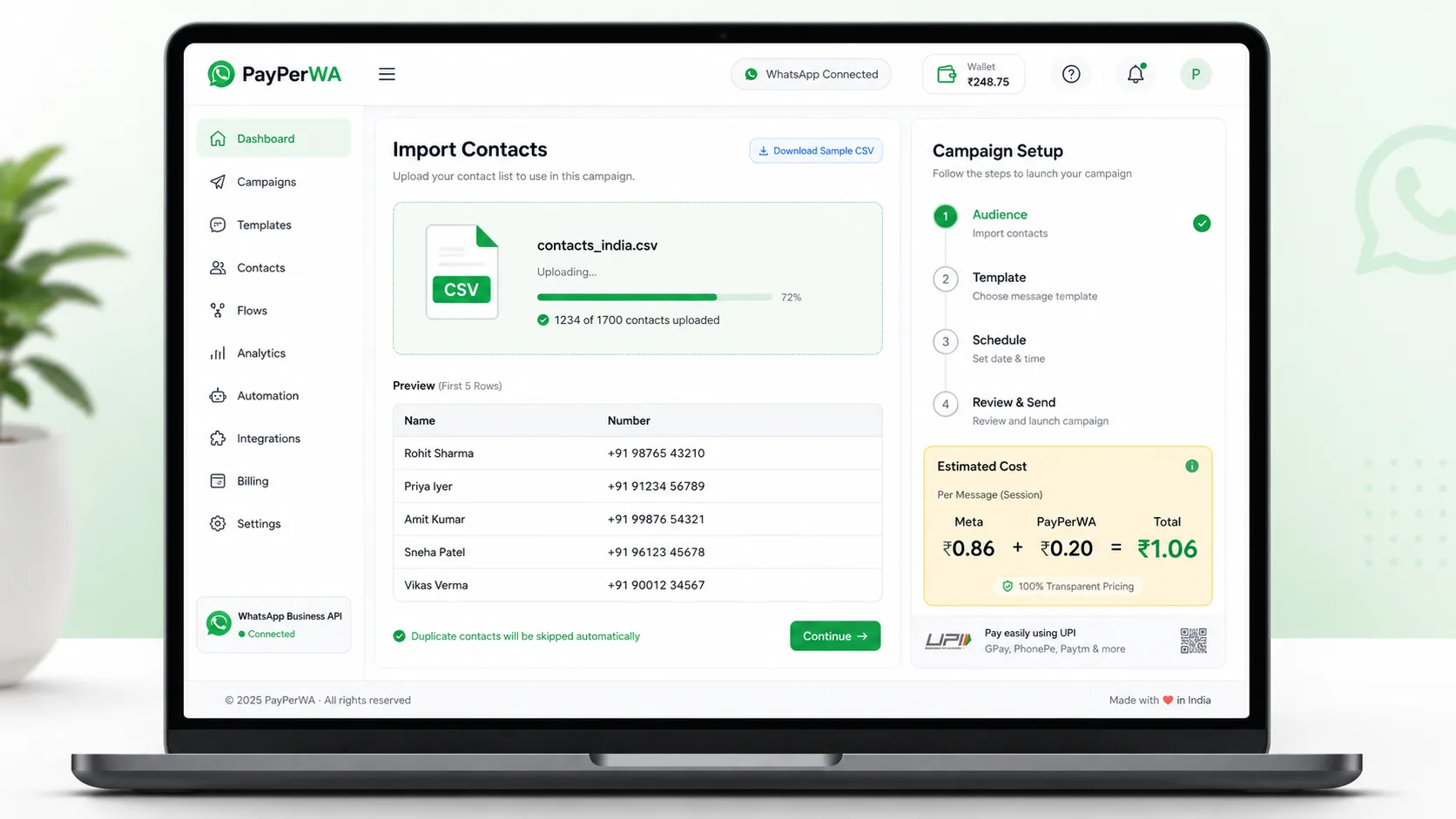
- Upload your contacts via CSV. Go to Contacts → Import and upload a CSV with phone numbers in international format (e.g. 919876543210). You never save these in your phone; they live in your PayPerWA contact list. Add tags or groups to segment them.
- Confirm opt-in. Mark contacts as opted in. You must have consent — a checkbox at checkout, a form submission, or a prior business relationship all count. PayPerWA blocks sending to anyone marked opted out.
- Pick or create an approved template. Use a template from the library or create your own and submit it to Meta for approval. Map variables like the customer's first name to your CSV columns.
- Recharge your prepaid wallet. Top up via Razorpay (UPI, card, or net banking). The wizard shows your estimated cost before you send.
- Launch the campaign. Select your contacts or group, review the cost estimate, and hit Send. PayPerWA queues the messages and delivers them through Meta at up to 80 messages per second, then shows live delivery and read reports.
That is it — thousands of opted-in customers reached, zero numbers saved on either side.
Opt-In and Compliance: You Still Need Consent
You can message unsaved numbers, but only ones that have opted in — consent is non-negotiable under both Meta's rules and Indian data-protection norms. Opt-in means the customer has clearly agreed to receive WhatsApp messages from your business. Sending to a scraped or purchased list will get your number quality rating downgraded and eventually banned.
Valid ways to collect opt-in in India include:
- A checkbox on your website, checkout, or lead form ("I agree to receive updates on WhatsApp").
- A customer messaging your number first or scanning a click-to-WhatsApp QR.
- An existing transactional relationship — someone who bought from you and shared their number for order updates.
- A missed-call or "send WHATSAPP to this number" SMS keyword opt-in.
Keep proof of consent and always include an easy way to opt out. PayPerWA honours opt-outs automatically and will not let a campaign send to anyone flagged as opted out. For a deeper walkthrough, see our WhatsApp opt-in compliance guide for India.
What It Costs — Meta Fee + PayPerWA Fee, Shown Separately
Sending bulk WhatsApp on PayPerWA costs Meta's standard rate plus a flat ₹0.20 platform fee per message — and we always show those two numbers separately so you know exactly where each paisa goes. There is no subscription; you only pay for what you send from a prepaid wallet.
| Message type | Meta fee | PayPerWA fee | Total per message |
|---|---|---|---|
| Marketing (offers, promos) | ₹0.86 | ₹0.20 | ₹1.06 |
| Utility (order, payment updates) | ₹0.13 | ₹0.20 | ₹0.33 |
| Authentication (OTP) | ₹0.13 | ₹0.20 | ₹0.33 |
| Reply inside 24h service window | FREE | ₹0.20 | ₹0.20 |
So a marketing blast to 1,000 opted-in customers costs about ₹1,060 all-in (Meta ₹860 + PayPerWA ₹200). A utility update to the same list costs roughly ₹330. We never quote a blended "₹1.06" without the breakdown, because Meta's fee is a pass-through that every platform pays equally — our fee is the flat ₹0.20. For the full picture, read our WhatsApp Business API pricing India 2026 guide.
Why You Should Avoid Unofficial Bulk-Sender APKs
You should avoid grey-market bulk-sender APKs and unofficial "WhatsApp sender" tools because they get your number permanently banned, deliver unreliably, and violate both Meta's terms and Indian law. These tools automate the consumer app or use cracked clients, which Meta detects quickly. The cost of a ban — losing your business number and customer base overnight — is far higher than the ₹0.20 per message the official API charges.
- Bans. Meta's anti-spam systems flag automation patterns and ban the number, often with no recovery.
- No delivery guarantee. Messages are throttled or dropped silently; you cannot see real delivery or read status.
- No verified name. Recipients see an unknown number, not your business identity, so trust and response rates collapse.
- Compliance risk. No opt-in tracking, no audit trail, no legal cover under DPDP-era expectations.
The official API costs a little per message, but it is the only deliverable, compliant, ban-safe way to reach unsaved numbers at scale. Think of the ₹0.20 platform fee as insurance for your most valuable asset — your WhatsApp number.
App vs Unofficial Tools vs Official API — Side by Side
The official WhatsApp Business API is the only option that reaches unsaved numbers at scale while staying compliant and ban-safe. The table below compares all three approaches Indian businesses commonly consider.
| Capability | Business App (free) | Unofficial APK / bulk sender | Official API (PayPerWA) |
|---|---|---|---|
| Send to unsaved numbers | No (must be saved) | Sometimes, until banned | Yes, with opt-in |
| Recipient must save you | Yes | No | No |
| Max per send | 256 (broadcast list) | Unpredictable | Thousands per campaign |
| Ban risk | Low | Very high | Low (official) |
| Verified business name shown | Yes | No | Yes |
| Delivery and read reports | Basic | None | Full real-time |
| Automation and scheduling | No | Risky scripts | Yes |
| Cost | Free but unscalable | Cheap but costs you your number | Meta + ₹0.20, no subscription |
For the conceptual difference between a broadcast, a campaign, and bulk sending, see our explainer on broadcast vs campaign vs bulk.
Templates: How First-Contact Messaging Works
To message an opted-in customer who has not chatted with you in the last 24 hours, you must use a pre-approved template — this is how the API allows outreach to unsaved numbers without spam. A template is a fixed message structure with placeholders for personalisation, which Meta reviews (usually within minutes to a few hours) and approves before you can send it.
A simple marketing template might look like: "Hi {{1}}, our Monsoon Sale is live — flat 30% off until Sunday. Reply STOP to opt out." When you launch a campaign, PayPerWA fills {{1}} with each contact's first name from your CSV. Once a customer replies, a 24-hour service window opens during which your replies are free and don't need a template.
- Marketing templates — offers, launches, promotions (Meta ₹0.86).
- Utility templates — order confirmations, payment reminders (Meta ₹0.13).
- Authentication templates — OTPs and verification codes (Meta ₹0.13).
PayPerWA ships with a library of 20+ ready templates so you can start in minutes. Explore them and the campaign wizard on our features page.
Getting Started Today
To start sending bulk WhatsApp without saving numbers, sign up for PayPerWA, connect your number via Embedded Signup, upload your opted-in CSV, and launch your first campaign — most businesses go live the same day. There is no subscription and no setup fee; you only fund a prepaid wallet for the messages you actually send.
Your first campaign checklist:
- Create your free account at payperwa.com/signup.
- Connect your WhatsApp Business number (about two minutes).
- Import your opted-in contacts and tag them.
- Pick a template and recharge your wallet via Razorpay.
- Send, then watch delivery and read reports update live.
You reach thousands of customers, in their most-used app, with your verified name showing — and not a single number saved on either side. For automated sequences after that first send, see our WhatsApp marketing automation guide.
Frequently Asked Questions
Can I send WhatsApp messages to numbers I haven't saved?+
How do I send bulk WhatsApp without saving contacts?+
Why don't WhatsApp broadcast lists work for unsaved numbers?+
Is it legal to send bulk WhatsApp messages in India?+
Do I still need opt-in if I use the API?+
What does it cost to send bulk WhatsApp on PayPerWA?+
Are unofficial WhatsApp bulk sender apps safe?+
How long does it take to start sending?+
Ready to Start WhatsApp Marketing?
No subscription. No monthly fee. Just ₹0.20 per message.
PayPerWA Team
We build India's most affordable WhatsApp marketing platform. No subscriptions, no hidden fees — just 20 paisa per message.