WhatsApp Abandoned Cart Recovery: Automation That Wins Back Lost Sales (2026)
WhatsApp abandoned cart recovery wins back lost sales with a 3-message automation. See the timing, copy, costs and setup for Indian e-commerce in 2026.
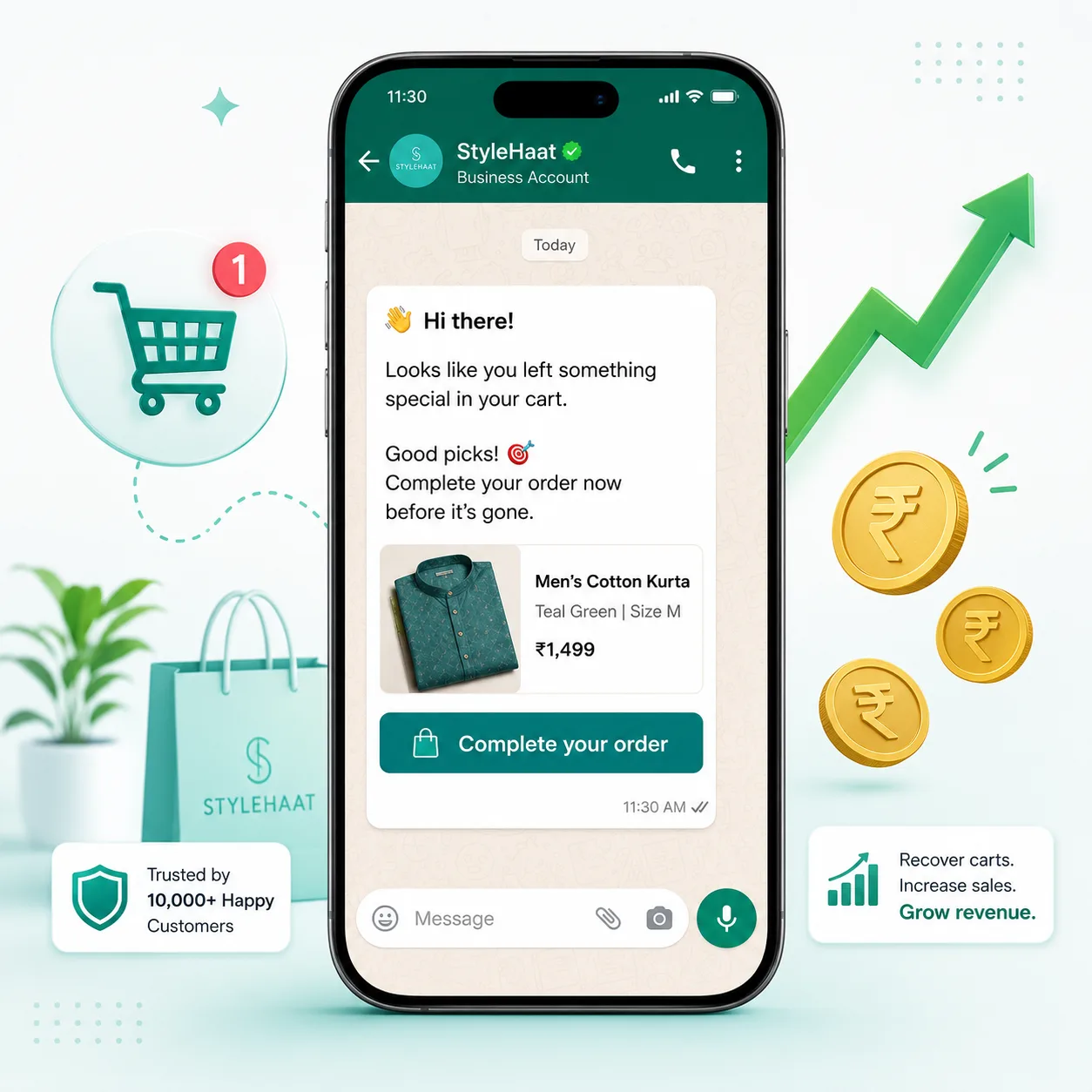
Key Takeaways
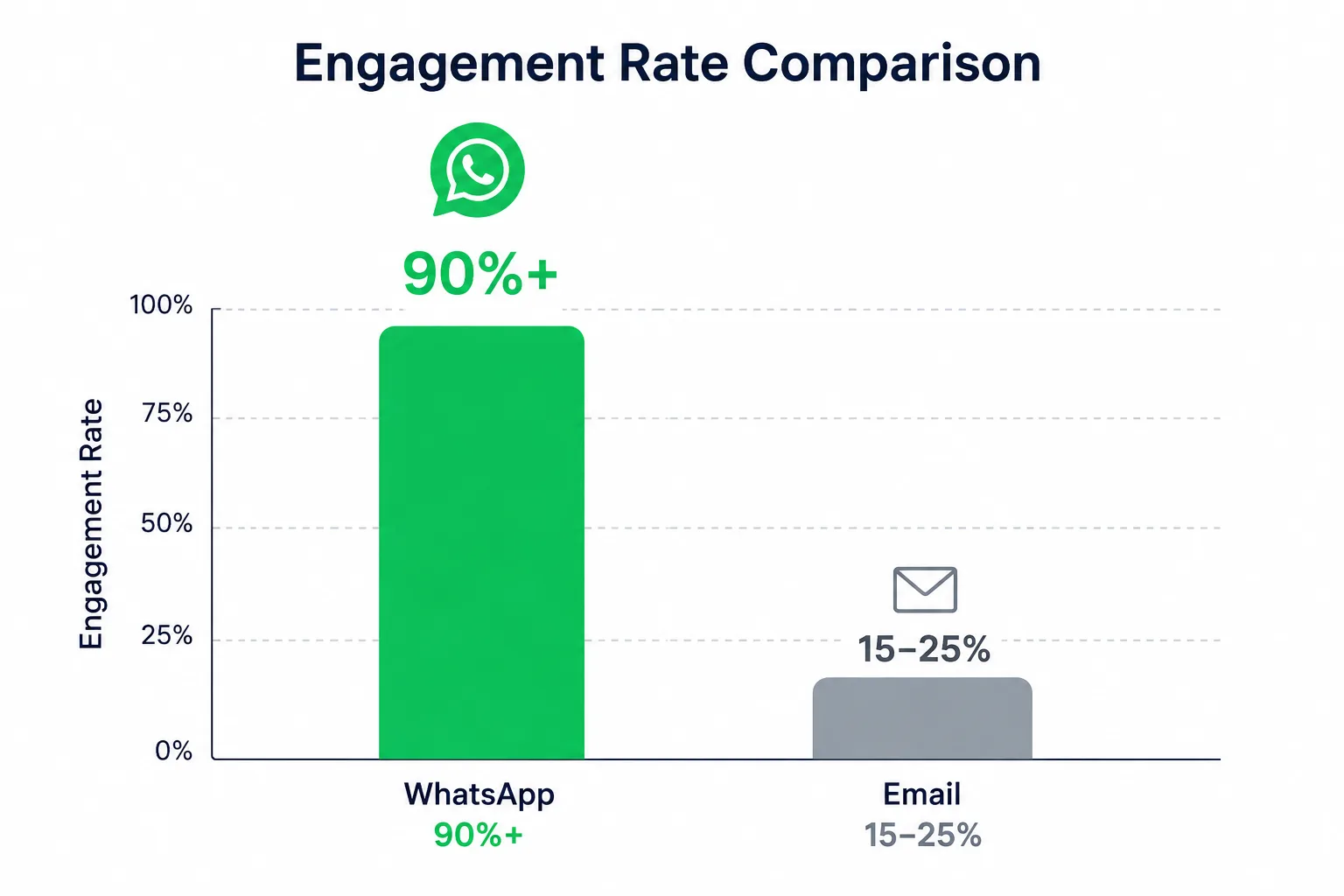
- About 70% of online carts in India are abandoned — WhatsApp recovers a slice email cannot, with 90%+ open rates versus 15-20% for email.
- The winning sequence is 3 messages: a gentle nudge at 1 hour, a value reminder at 24 hours, and a final incentive at 48 hours.
- Cart reminders are usually Utility templates (Meta ₹0.13) but flip to Marketing (Meta ₹0.86) the moment you add a discount or promotional language.
- On PayPerWA you pay ₹0.20 platform fee per message plus the correct Meta rate — no subscription, prepaid wallet only.
- Recovering even 10% of abandoned carts at a ₹1,500 average order value can add lakhs in monthly revenue for a mid-size D2C store.
What is WhatsApp abandoned cart recovery?
WhatsApp abandoned cart recovery is an automation that sends timed reminder messages on WhatsApp to shoppers who added items to their cart but did not complete checkout. The goal is simple: bring the buyer back to finish the purchase before they forget, get distracted, or buy elsewhere.
Cart abandonment is the single biggest leak in Indian e-commerce. Across global studies the average abandonment rate sits around 70% — meaning for every 10 carts created, 7 are abandoned. Reasons are familiar to every Indian store owner: unexpected shipping costs, a clunky checkout, payment failures on UPI or cards, distraction, or simply "I will buy later" that never comes.
Email recovery has been the default answer for a decade. But in India, where WhatsApp has over 500 million users and is the default messaging app, a recovery message that lands in WhatsApp gets seen almost instantly. That single behavioural difference — getting seen — is why WhatsApp cart recovery now outperforms email for most D2C and retail brands. If you sell online, this is the highest-ROI automation you can switch on. See our WhatsApp marketing for e-commerce guide for the wider picture.
Why WhatsApp beats email for cart recovery
WhatsApp beats email because it is opened. Recovery only works if the message is read, and the open-rate gap between the two channels is enormous.
| Metric | ||
|---|---|---|
| Average open rate | 90-98% | 15-25% |
| Average click-through | 30-45% | 2-5% |
| Time to first read | Minutes | Hours / days |
| Lands in | Personal chat | Promotions tab / spam |
| Reply-back possible | Yes, two-way | Rarely read |
The numbers tell the story: an email that recovers 5% of carts and a WhatsApp message that recovers 15-20% is a 3-4x difference on the exact same audience. WhatsApp also lets the shopper reply — "is COD available?", "any size left?" — turning a one-way reminder into a conversation that closes the sale. To go deeper on channel strategy, read our WhatsApp marketing for e-commerce strategies post.
The ideal 3-message recovery sequence
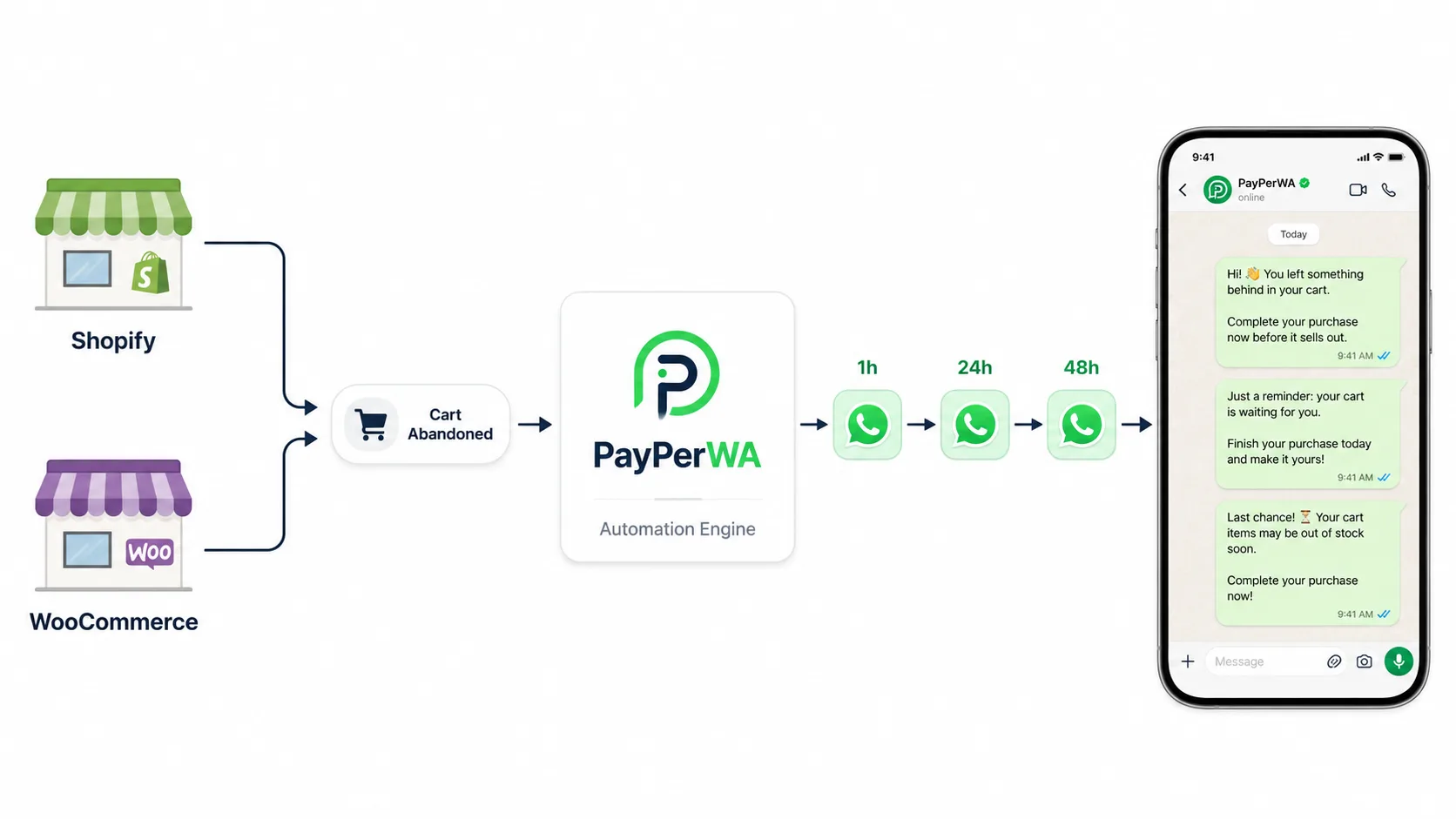
The ideal recovery sequence is three messages spaced over 48 hours: a nudge at 1 hour, a value reminder at 24 hours, and a final incentive at 48 hours. More than three messages annoys; fewer leaves money on the table.
Each message has one job. The first reminds, the second reassures, the third closes with an incentive. Here is the full sequence with timing, goal, sample copy and the correct template category.
| # | Timing | Goal | Example message | Template type |
|---|---|---|---|---|
| 1 | 1 hour after abandon | Gentle reminder | Hi Riya, you left a Cotton Kurta Set in your cart. It is still saved for you — complete your order here. | Utility (₹0.13) |
| 2 | 24 hours after abandon | Reassure + remove friction | Still thinking it over? Your Cotton Kurta Set is selling fast. Free shipping and easy returns. Checkout in one tap. | Utility (₹0.13) |
| 3 | 48 hours after abandon | Close with incentive | Last chance! Use code BACK10 for 10% off your Cotton Kurta Set. Offer ends tonight. | Marketing (₹0.86) |
Notice the third message is a Marketing template — the moment you add a discount code or promotional language, Meta classifies it as marketing and charges the higher rate. We unpack that rule below. For more wording ideas, browse our WhatsApp template message examples.
Why the timing matters (1h, 24h, 48h)
The timing works because it matches how buying intent decays. Intent is highest right after abandonment and drops sharply over the next two days, so each message catches a different mindset.
- 1 hour — the "I got distracted" buyer. Most abandonment is accidental: a phone call, a crying baby, a failed UPI payment. A reminder within the hour catches a shopper who still wants the item and just needs a one-tap path back.
- 24 hours — the "I am comparing" buyer. By the next day the shopper is weighing options. This message removes friction — free shipping, easy returns, "selling fast" urgency — without yet spending margin on a discount.
- 48 hours — the "needs a push" buyer. If they have not bought in two days, a small incentive tips the decision. This is where you spend a discount, because the shopper is otherwise lost.
Sending all three immediately, or all within an hour, feels like spam and triggers blocks. Spacing them respects the buyer and protects your WhatsApp sender quality rating.
How to set it up: Shopify, WooCommerce or custom
Setting up cart recovery means connecting your store's "cart abandoned" event to PayPerWA so the sequence fires automatically. There are three common paths.
- Shopify. Use Shopify's checkout/cart webhooks (or an abandoned-checkout app) to POST the cart event — customer phone, name, product, cart URL — to your PayPerWA webhook endpoint. PayPerWA then schedules the 1h / 24h / 48h messages.
- WooCommerce. A cart-tracking plugin captures the phone number at checkout and fires a webhook on abandonment. Map that to the same PayPerWA endpoint.
- Custom store. When a checkout is started but not completed, call the PayPerWA API with the contact and template variables. This is the cleanest approach because you control exactly when the "abandoned" event fires (for example, 60 minutes of inactivity).
In all three cases the flow is identical once the webhook lands: PayPerWA creates the contact, schedules the three template messages, and a wallet balance check gates each send. If the wallet is empty the automation pauses instead of failing silently. Explore the building blocks on our features page, and see the broader automation patterns in our WhatsApp marketing automation guide.
Template categories and what each message costs
Cart reminders cost ₹0.20 PayPerWA platform fee per message plus the correct Meta rate — and the Meta rate depends entirely on whether the template is Utility or Marketing. This is the single most misunderstood part of cart recovery billing.
The breakout rule: a transactional reminder ("your cart is saved", "complete your order") is a Utility template at Meta ₹0.13. The moment you add a discount, coupon code, or promotional push ("10% off", "sale ends tonight"), Meta reclassifies it as Marketing at ₹0.86. Same cart, very different cost.
| Message | Category | Meta fee | PayPerWA fee | Total per message |
|---|---|---|---|---|
| Msg 1 — reminder | Utility | ₹0.13 | ₹0.20 | ₹0.33 |
| Msg 2 — reassure | Utility | ₹0.13 | ₹0.20 | ₹0.33 |
| Msg 3 — discount | Marketing | ₹0.86 | ₹0.20 | ₹1.06 |
| Full 3-message sequence | Mixed | ₹1.12 | ₹0.60 | ₹1.72 |
So a complete recovery attempt on one abandoned cart costs about ₹1.72 all-in (Meta ₹1.12 + PayPerWA ₹0.60). If that cart is worth ₹1,500 and you recover even one in eight, the maths is overwhelmingly in your favour. A shopper who replies inside the 24-hour window costs only ₹0.20 for your reply — Meta charges nothing for session replies. See full rates on our pricing page.
Personalization and incentives that convert
Personalization is what separates a recovered cart from a deleted message. A generic "you left something behind" performs far worse than a message that names the buyer and the exact product.
- Use the buyer's name and product. "Hi Riya, your Cotton Kurta Set is still saved" beats "You have items in your cart" every time. Pass these as template variables.
- Add a deep link to the saved cart. One tap should reopen the exact cart, pre-filled — never send them to a generic homepage.
- Show the item, not just text. Use a template with an image header of the abandoned product for a stronger visual pull.
- Hold the discount for message 3. If you discount in message 1, you train buyers to abandon on purpose. Lead with reassurance (free shipping, returns), then incentivise only the holdouts.
- Make incentives feel earned and scarce. "BACK10, ends tonight" converts better than an open-ended coupon.
For deeper sequencing logic across the customer lifecycle, see our WhatsApp drip campaign guide.
Measuring recovery rate and ROI
You measure cart recovery by tracking how many abandoned carts convert after the sequence, then comparing recovered revenue against message cost. The core metric is recovery rate = recovered orders / abandoned carts.
Here is a worked example for a store with 1,000 abandoned carts a month and a ₹1,500 average order value:
| Item | Value |
|---|---|
| Abandoned carts / month | 1,000 |
| Sequence cost (1,000 × ₹1.72) | ₹1,720 |
| Recovery rate | 12% |
| Recovered orders | 120 |
| Recovered revenue (120 × ₹1,500) | ₹1,80,000 |
| ROI | ~104x |
Even at a conservative 6% recovery rate the ROI stays above 50x, because the message cost is tiny relative to order value. Track which message in the sequence drives the most conversions and tune timing and copy from there. Use PayPerWA delivery and read reports plus your store's order data to attribute recovered sales.
Compliance and opt-in rules you must follow
Compliance protects both your customers and your WhatsApp sender rating. Recovery messages are only allowed to contacts who have opted in, and you must respect opt-outs immediately.
- Collect opt-in at checkout. A clear checkbox — "Send me order and cart updates on WhatsApp" — is the cleanest consent. Never message a number scraped without permission.
- Use approved templates only. Business-initiated messages outside the 24-hour window must use a Meta-approved template; free-text blasts are blocked.
- Honour opt-outs instantly. If a buyer replies STOP or asks to unsubscribe, set them to opted-out so no further automation reaches them. PayPerWA blocks sends to opted-out contacts.
- Keep the category honest. Do not disguise a marketing discount as a utility reminder — Meta auto-reclassifies and can penalise template quality.
- Cap frequency. Three messages over 48 hours, then stop. Repeated chasing damages your rating and your brand.
PayPerWA enforces opt-out blocking and template approval at the platform level, so a compliant setup is the default, not an afterthought.
Getting started with PayPerWA
Getting started takes about an hour: connect WhatsApp, create your reminder templates, wire up the cart-abandoned webhook, and load your wallet. Here is the order of operations.
- Create a free account. Sign up on PayPerWA — no subscription, you only pay per message from a prepaid wallet.
- Connect WhatsApp. Onboard your number through embedded signup; PayPerWA uses the Meta Cloud API directly, so there is no BSP markup.
- Build three templates. Two Utility (reminder, reassure) and one Marketing (discount). Submit them for Meta approval — usually minutes to a few hours.
- Connect your store. Point your Shopify, WooCommerce, or custom cart-abandoned webhook at PayPerWA with the buyer's phone, name, product and cart URL.
- Recharge your wallet via UPI. Even ₹500 covers hundreds of recovery attempts. The wallet gate pauses automation if it runs dry, so keep a buffer.
From there the sequence runs on autopilot, quietly recovering carts while you sleep. Compare the economics on our pricing page and see what else you can automate in the auto-reply and welcome automation guide.
Frequently Asked Questions
How many cart reminder messages should I send?+
How much does WhatsApp cart recovery cost in India?+
Is a cart reminder a Utility or Marketing template?+
Does WhatsApp really recover more carts than email?+
Can I connect cart recovery to Shopify or WooCommerce?+
What happens if my wallet runs out mid-sequence?+
Do I need opt-in to send cart reminders?+
Ready to Start WhatsApp Marketing?
No subscription. No monthly fee. Just ₹0.20 per message.
PayPerWA Team
We build India's most affordable WhatsApp marketing platform. No subscriptions, no hidden fees — just 20 paisa per message.